
For cement plant owners, GMs & plant heads
Your plant data already knows where the profit is leaking
Get your free cement-plant savings estimate in 30 seconds.
Get AI predictions, prescriptive recommendations, and answers from an AI copilot on anything about your plant's numbers — just by uploading a DCS or historian export. It generates a gap report, every gap valued in ₹ per month, with the operator action behind it.
Or enter the shift log — takes about ten minutes — and AI predictions start within 48 hours.
Want DCS integration to suggest setpoints? We scope a read-only OPC UA connection with your instrumentation/IT team, on a server inside your plant network — and the predictions run against the kiln as it turns.
No sensors, no site visit. Free during early access.
Three numbers you know by heart, 30 seconds, nothing stored — or upload a month of data for the full ₹-quantified report. The tour is real screens, no signup.
Download a sample report (PDF)·How it works
21
plant data sheets analyzed
50+
AI predictions per plant
₹ / month
every finding financially valued
Free
full access during early access
The 2-minute tour
Five stops, in the order the money moves — from one number to the operator setting behind it. Not mockups: screenshots of the running platform on its built-in demo plant, a fictional 3.5 MTPA unit. Load a month of your own data and these become your numbers.
- 01
The leak, in ₹
One number: what this plant is losing per month, across every area.

What the plant is losing — today, this month, this year. 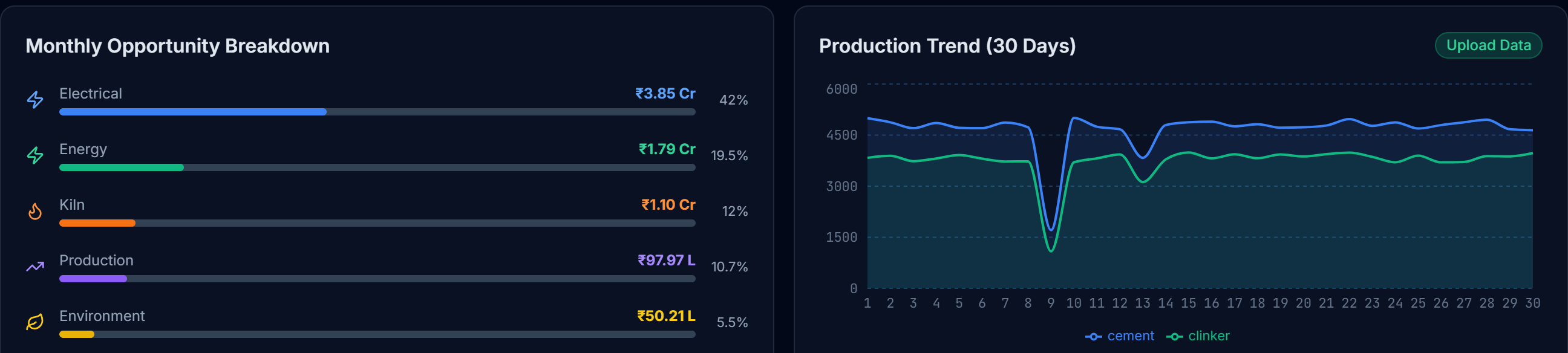
And what that one number is made of, module by module. - 02
Where it comes from
Open the kiln and see the heat-rate gap that produced that number.
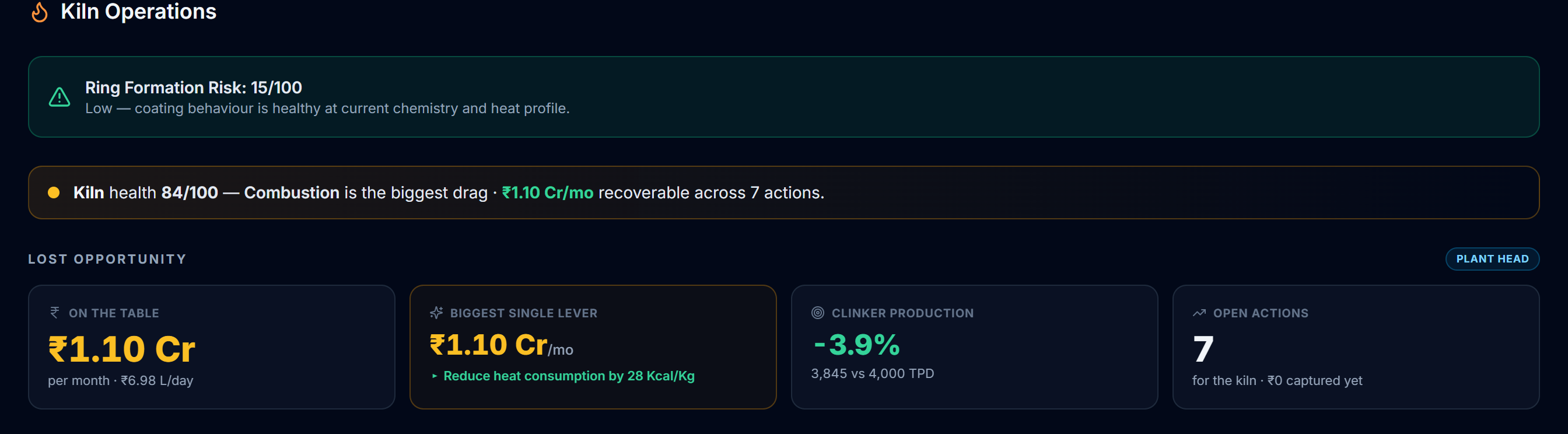
Open any area and see the gap behind that number. - 03
What to actually do
A recommendation with the operator setting to change — and what closing it is worth.

The setting to change, ranked by what it is worth per day. - 04
The report
The same findings as a PDF you can hand to a GM without explaining a dashboard.
Rather than show you a picture of one — here is a real one, generated by the engine from the demo plant above.
Download the sample report (PDF) - 05
Now your plant
The tour ends on the only question that matters: what would this take on your numbers?
Three numbers and 30 seconds — or a month of data for the whole picture.
The ₹ figures above are the demo plant’s, not a customer’s.
How this works for your plant
Two ways in. Watch it run on a demo plant first, or point it at your own numbers — most plants do both, in that order.
See it working, with nothing to prepare
The same five stops as the tour above — but live, in the real product rather than in screenshots. Sign in and load the built-in demo plant (a fictional 3.5 MTPA unit with a full month of data) and a guided walkthrough offers to take you through them, on the same screens your team would use.
Free, no data, no NDA — you only need an email to sign in, plus a couple of minutes while the engine analyses the demo month.
Run it on your own plant
Whatever your plant already has, there is a way in. No sensors and no site visit — and nothing has to touch your control system to get your first report.
Most plants start with an export. If your data cannot leave the site, start with the shift log.
"We already export from the DCS or historian"
Excel or CSV export
You see something
Minutes from upload
It costs you
One export, once
- Export what your DCS, historian or log sheet already produces — or download our template if it is easier.
- Upload the file, or paste the rows straight out of the sheet you have open.
- The engine values every gap in ₹ per month and hands back the operator actions behind each one.
"Our data cannot leave the site"
Shift log
You see something
Same shift
It costs you
~10 minutes a shift
- One operator types the readings already written on the log sheet — kiln, raw mill, energy.
- The grid opens on the current shift and fills down, so it is a shift at a time, not a field at a time.
- You get a costed report from the first shift you save. Forecasting switches on later, and the page shows exactly how many hours are left.
"We want it reading the control system live"
PLC / DCS integration (OPC UA)
You see something
Weeks, not minutes
It costs you
Your IT team and a scoping call
- We agree a tag list with your IT team, then connect read-only over OPC UA to your DCS server or historian — PI, AVEVA, Wonderware or the DCS OPC server itself.
- The platform is installed on a server inside your plant network. Nothing leaves the premises and the analysis has no internet dependency.
- Tags then arrive continuously, so the dashboard tracks the kiln as it runs instead of the last export somebody remembered to take.
Not sure which fits? Start with whichever needs no permission from anyone — you can switch or combine them later, and the analysis is the same either way.
What the report finds
On our demo dataset — a fictional 3.5 MTPA plant — the engine identifies ₹5.55 crore per month of savings opportunity across 51 specific recommendations. Your numbers will be your own; the method is the same.
Kiln heat rate
Excess Kcal/Kg clinker vs achievable target, valued at your coal cost — plus CO, exit-gas heat recovery and stability findings.
Mill specific energy
kWh/T gaps per mill against its own demonstrated capability — separator speed, moisture and Blaine over-grinding attributions.
Power & electrical
Power factor penalty, specific power vs benchmark, demand-window patterns from your own load profile.
Quality windows
Free lime, LSF drift and 28-day strength forecasts — catching giveaway and reject risk before the lab does.
Lost production
Availability gaps and throughput below demonstrated capability, valued at contribution margin — not inflated sale price.
AI copilot
Ask "why is clinker production below target?" and get answers grounded in your uploaded numbers, not generic advice.
Cloud — or entirely inside your plant
Most plants start on the cloud for speed. If your data-security policy says nothing leaves the premises, we deploy the same platform on a server inside your plant network.
Cloud — cementai.in
- Start today — upload your first export in minutes
- Hosted in an isolated environment, encrypted in transit
- Updates and new AI checks land automatically
- Best for the free savings report and pilots
On-premise
FOR STRICT DATA-SECURITY POLICIES
- Runs on a single server inside your plant network
- Plant data never leaves your premises — no internet dependency for analysis
- Your IT team keeps full control of access and backups
- Scoped and priced per plant — tell us in the form below
Not sure which fits your IT policy? Mention it in the form — we'll advise honestly, including starting the free report on-premise if that's what your policy requires.
Your data stays yours
We know plant data is commercially sensitive. We built the platform around that — and we put it in writing before you send a single row.
- Your data is never used to train AI models
- Strict tenant isolation — no other plant can see your numbers
- Mutual NDA on request, before you send anything
- Full deletion within 30 days on request (DPDP Act 2023)
- On-premise option: the entire platform can run inside your plant network
Straight from the founder
CementAI is founder-run. When you send your data, it is analyzed and reviewed personally — you talk to the person who built the engine, not a sales team. If your plant's export format doesn't match the template, we'll map it together on a call.
Would you rather we ran the first one with you?
Two reasons to use this instead: you want someone to sit with the first export and the mutual NDA, or you are scoping the read-only OPC UA link and need a conversation with your instrumentation team in it. Either way we reply within one working day.
Have the export already? You do not need us for this. Upload it yourself and get the report in minutes →
Rather not fill in a form? Message us on WhatsApp